Inspect Active WordPress Themes and Template Files in Chrome Quickly
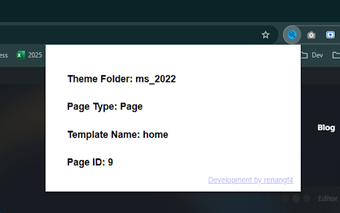
WordPress Theme Inspector, from Morais Tech, is a Chrome extension for WordPress developers and designers who need fast structural checks. It displays the active theme folder and the exact PHP template file for the current page plus quick post metadata via a toolbar click. The extension ships as a very small installer and operates locally without external calls, making it suitable for audits, quick debugging, and onboarding on unfamiliar WordPress sites.
What does the extension reveal about a page's WordPress setup?
The extension exposes developer-level identifiers: the active theme folder name, the exact PHP template used to render the current view, and basic post metadata. Activating the toolbar icon shows these technical values without opening DevTools or searching page source, which helps when tracing nested template hierarchies or auditing third-party themes. The output emphasizes actionable, code-facing details rather than marketing names.
How light is its footprint during routine inspections?
The tool is approximately 17KiB and described as minimal in design, so it imposes very little runtime overhead during brief checks. It does not change page behavior and integrates with Chrome and other Chromium-based browsers that accept Chrome Web Store extensions. That small footprint makes it practical for spot inspections across multiple sites without adding significant memory or CPU load to a typical browsing session.
What privacy model governs its operation?
The developer built the extension to run entirely in the browser and not to collect user data or contact external servers. That local-only operation reduces exposure to remote tracking and keeps inspection results confined to the user's session. This model fits teams and individuals performing on-site audits or onboarding who prefer tools that do not transmit site or browsing details to third parties.
Best used as a quick confirmation tool, not a replacement for full debugging
This extension is well suited to developers who want fast, privacy-aware checks during audits or when learning unfamiliar themes, since it focuses on a single inspection task. It complements rather than replaces interactive debugging workflows; developers needing live editing, breakpoint tracing, or deep performance profiling should continue to use their full DevTools and editor toolchain alongside this utility.